| Animation by Example: Using a
Series of Images by David Matuszek |
So far we've just been moving images around on the screen. To make an individual image "do something"--for example, to have a bird that flaps its wings, or a dog that wags its tail, or a skull that rotates, we need a series of images. The rotating skull above, for example, uses 24 separate images. The more images, the smoother the motion.
There are two ways to animate an individual image:
The above applet uses the second approach (individual GIF files).
Instead of loading a single image, as before:
      imageURL = new URL(appletLocation +  "/images/t-skull-0.gif");
      skull = getImage(imageURL);
      tracker.addImage(skull, 0);
we now load them into an array:
       for (int i = 0; i < 25; i++) {
         skullURL = new URL(appletLocation +  "/images/t-skull-" + i + ".gif");
         skull[i] = getImage(skullURL);
         tracker.addImage(skull[i], 0);
       }
(Notice the use of the array index in constructing the name of the GIF file.) And instead of drawing the same image every time:
g.drawImage(controller.skull, model.xPosition, model.yPosition, null);
we choose an image from an array:
    skullNumber = (skullNumber + 1) % 24;
    g.drawImage(controller.skull[skullNumber], model.xPosition, model.yPosition, null);
(Notice the use of the mod operator, %, to go from 23 back to
0.)
You can find lots of images on the web, but you may not find exactly what you want, and many of the images are copyrighted.
Any time you "borrow" an image, you should give credit to the place you found it. It's almost certainly legal to use copyrighted images in programs you just write for yourself (that's "fair use"), but if you plan to put the images back on the web, you had better get permission from the copyright owner.
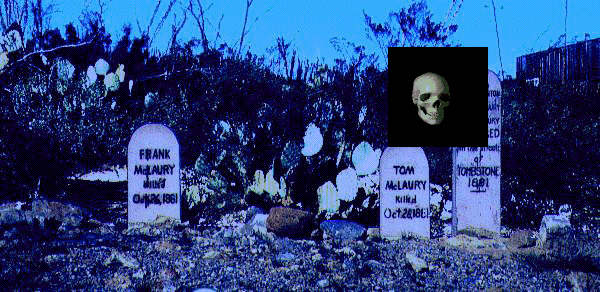
You may need to adjust images in some way, such as making the graveyard scene bluer. Another thing you will very often need to do is to make part of a GIF transparent. GIFs have one color called "transparent" that is invisible, so you can see the background through it. All images are rectangles, and unless you want a rectangle moving around on your screen, you will need to use this color. Here's a picture (not a working applet) of what the graveyard would look like if the area around the skull were not transparent:
By the way, if you change a copyrighted image, it's still copyrighted.
Credits:
|
|
|